Skip to content
ILoveNotch

Features

Everything it does.

Eighteen tabs and activities, each asleep until you need it. Most are in both editions; a few need the direct download, because the App Store's sandbox doesn't allow them.

Both editions

The notch

Opens on hover, click, a two-finger pull or ⌃⌥O, and closes when you move away.

  • Six ways to open and close: spring, jelly, pop, smooth, snappy or instant.
  • Drag the bottom-right corner to resize it, and pin it open.
  • An app drawer like Launchpad, with the tabs in your own order.
  • Eleven themes that restyle every tab, from Black and Liquid Glass (macOS 26) to Paper and Terminal.
  • Works on every display: a drawn notch in the menu bar, or a floating pill.
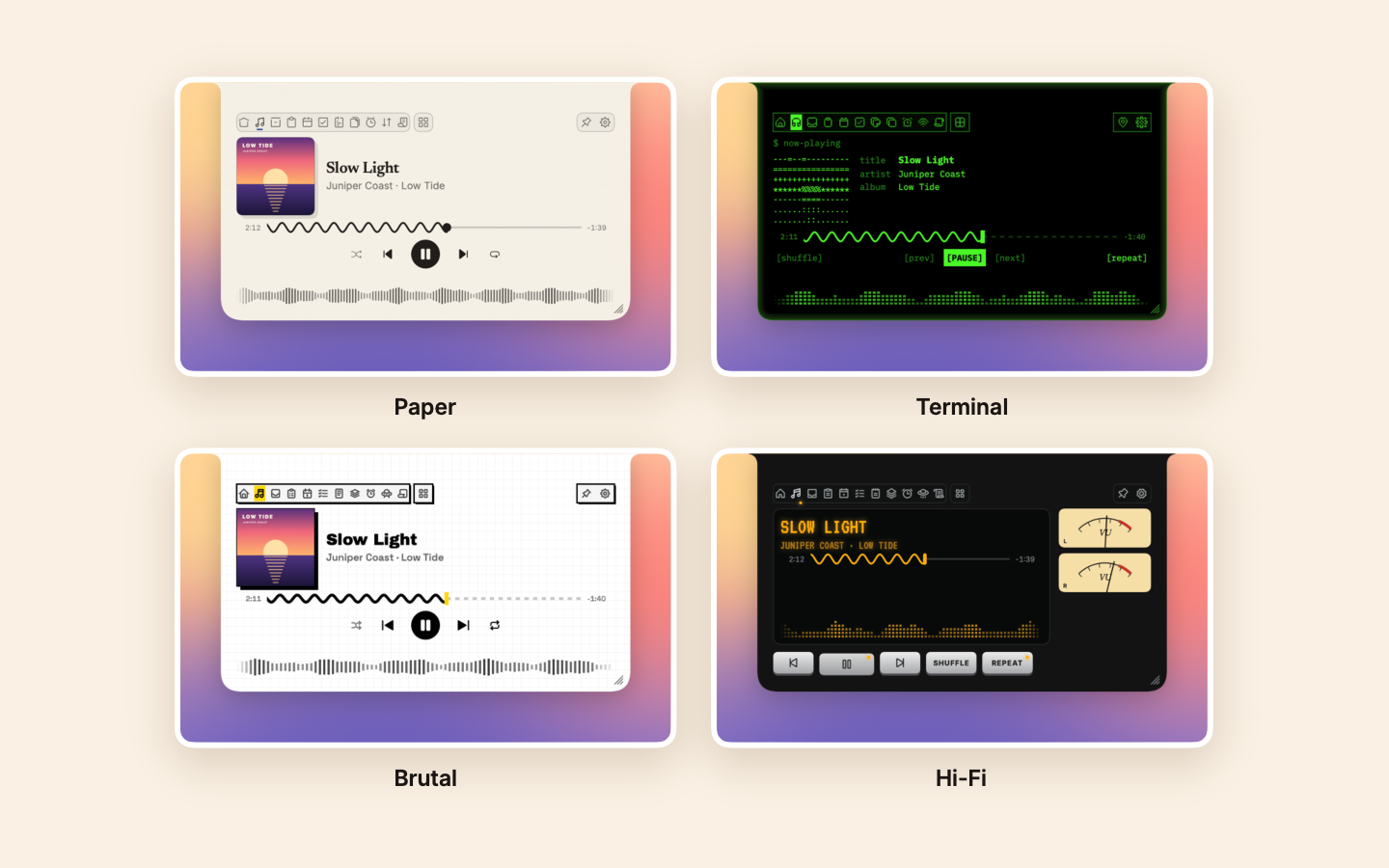
One song on the Media tab in four themes: Paper, Terminal, Brutal and Hi-Fi
Both editions

Home

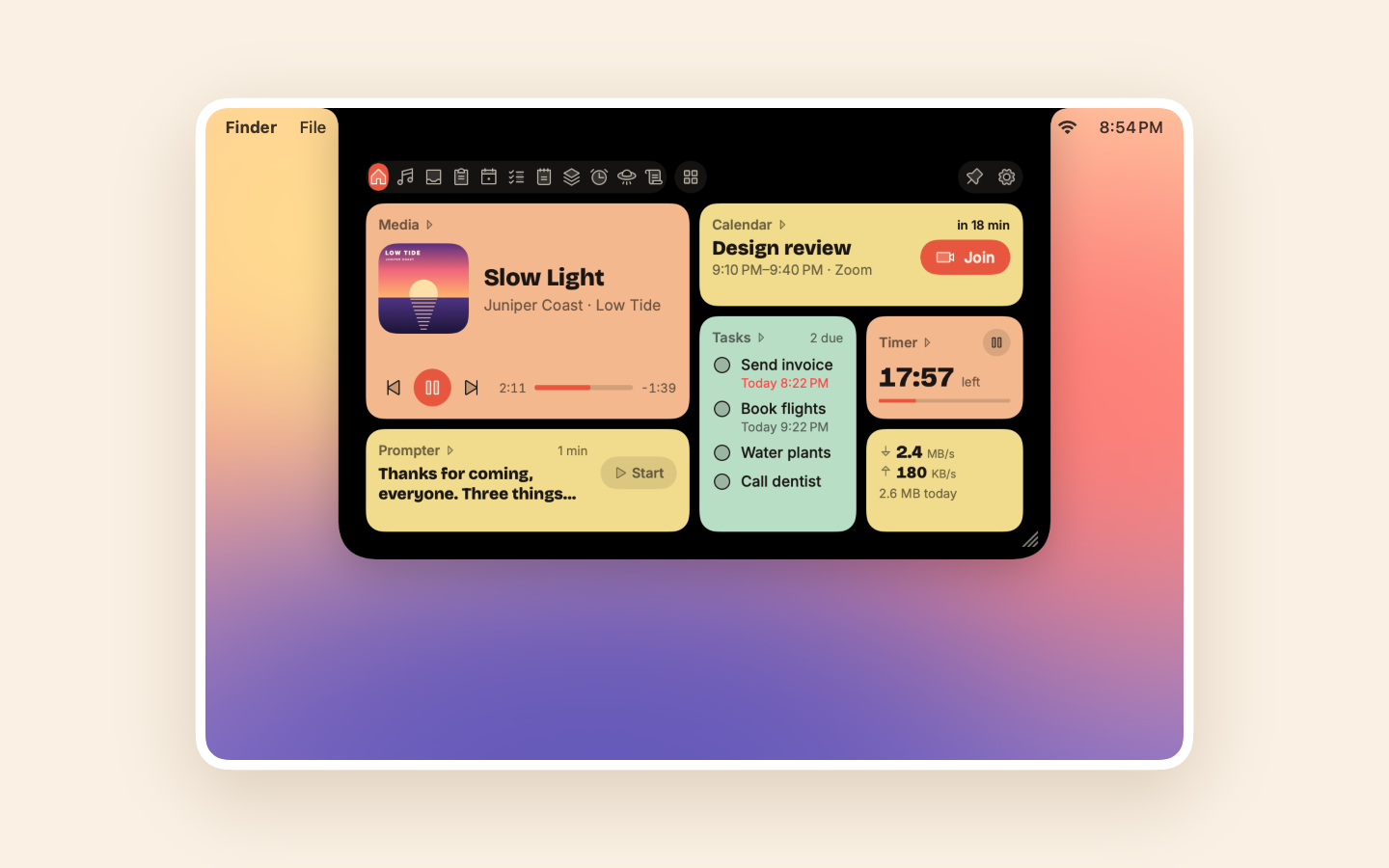
Your music, what's next today, your tasks, a timer and your script as tiles, each opening its tab.

  • Buttons work right on the tile: play, Join a call, start your script.
  • Remove tiles, drag one onto another to reorder, and add your latest note, recent copies, favorite shortcuts or network speed.
  • More tiles than fit go on pages you swipe through.
  • Off until you turn it on, in Settings or the app drawer.
The Home tab in Bento: tiles for the song playing, the next meeting with Join, tasks, a timer, the prompter and network speed
Both editions

Media

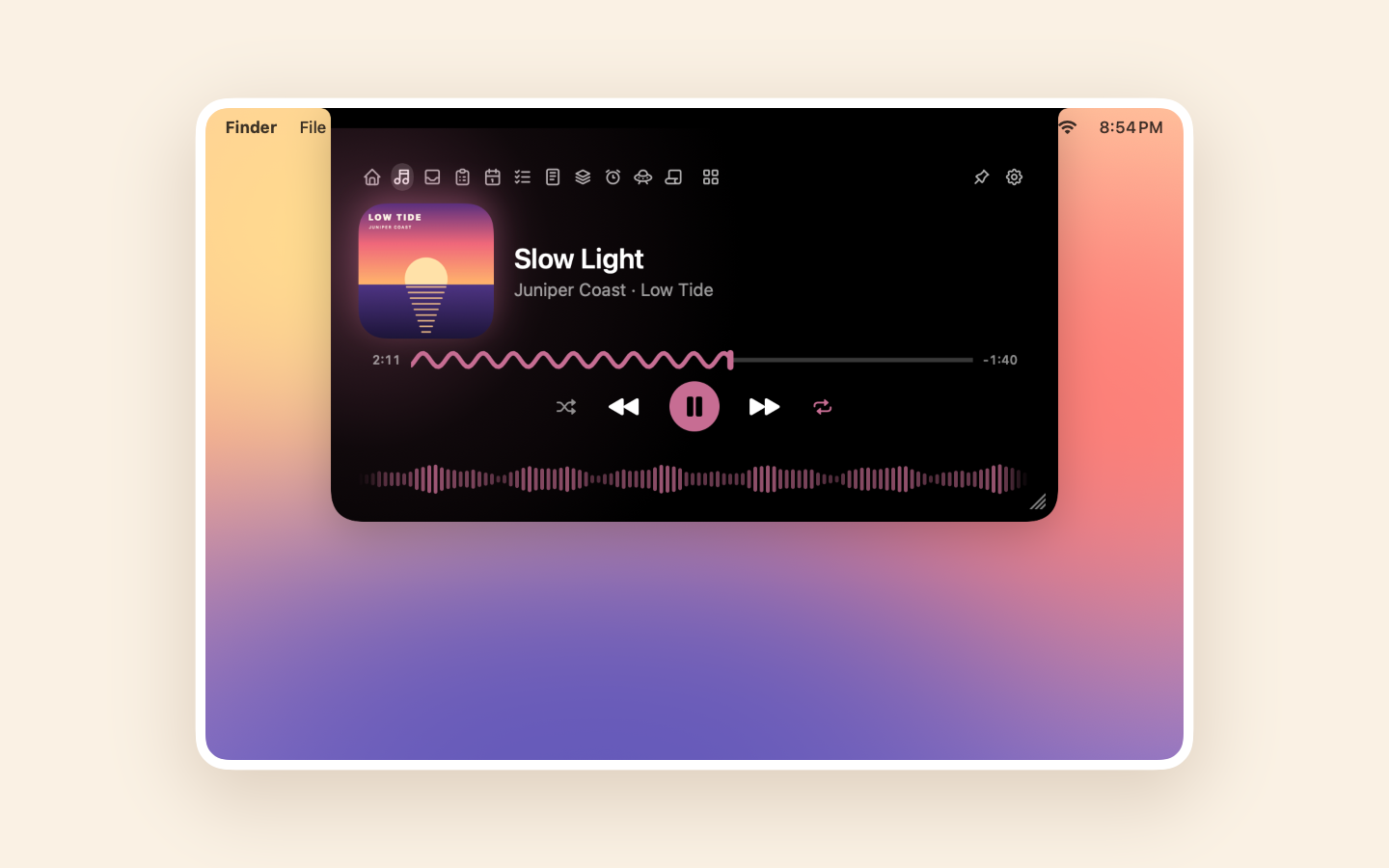
What's playing in any app, led by its cover, with a wavy seek bar and a waveform that moves with the sound.

  • Controls, shuffle and repeat, and 15-second skips for podcasts.
  • Music's up next and lyrics, Spotify's recently played, and the output, a click away.
  • Swipe sideways to skip.
  • The cover stays in the closed notch while it plays.
The Media tab: the cover, a wavy seek bar, shuffle and repeat, and a live waveform
Direct download

Sound

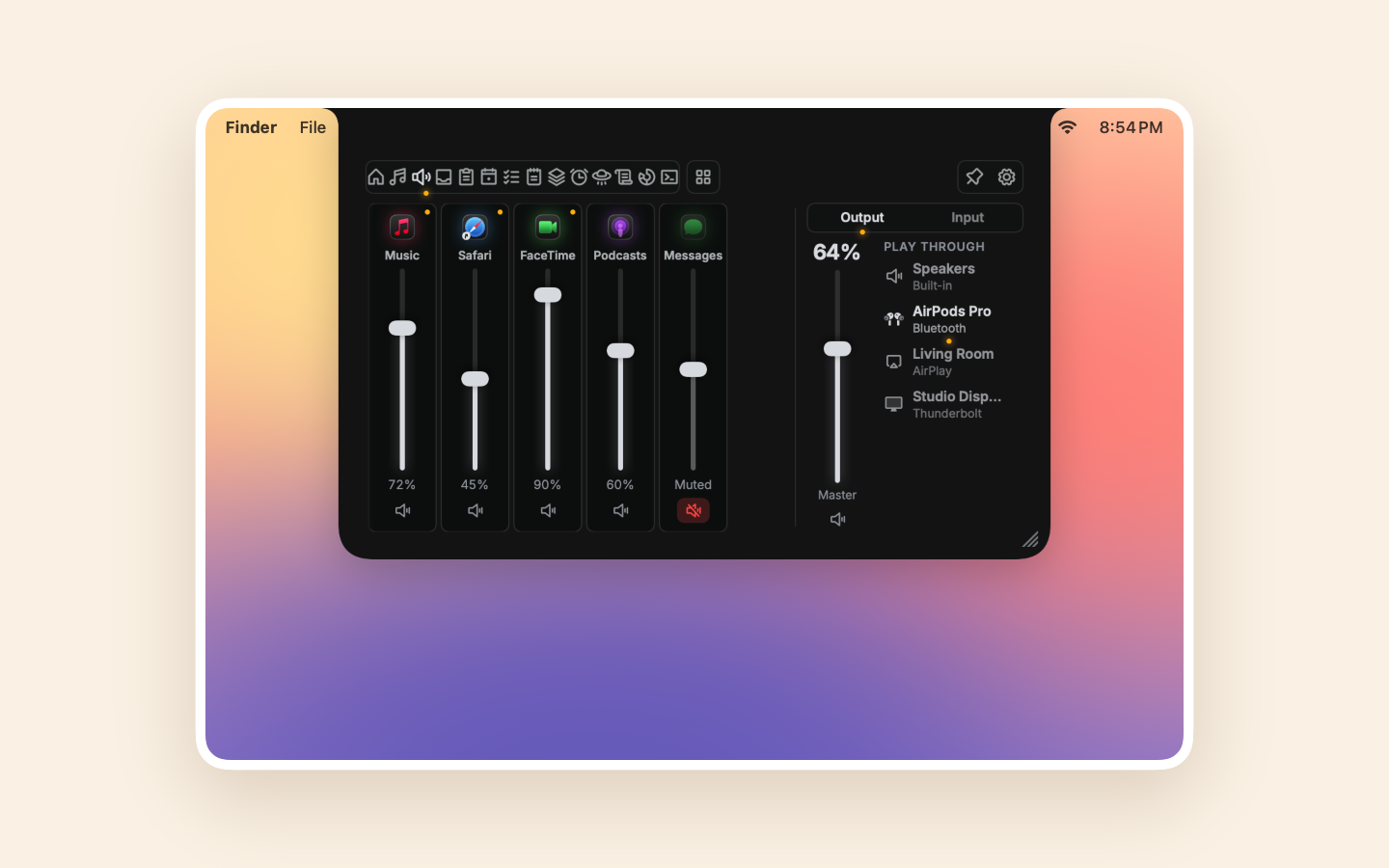
A mixer desk: a fader for every app playing sound, beside the master volume, your outputs and microphone.

  • Turn one app down or mute it, without touching the rest.
  • Switch between speakers, headphones, AirPods, AirPlay and displays, each saying how it connects.
  • No audio driver: Core Audio process taps, only while an app is turned down.
The Sound tab in Hi-Fi: faders for Music, Safari, FaceTime, Podcasts and Messages, beside the master volume and the outputs
Both editions

Shelf

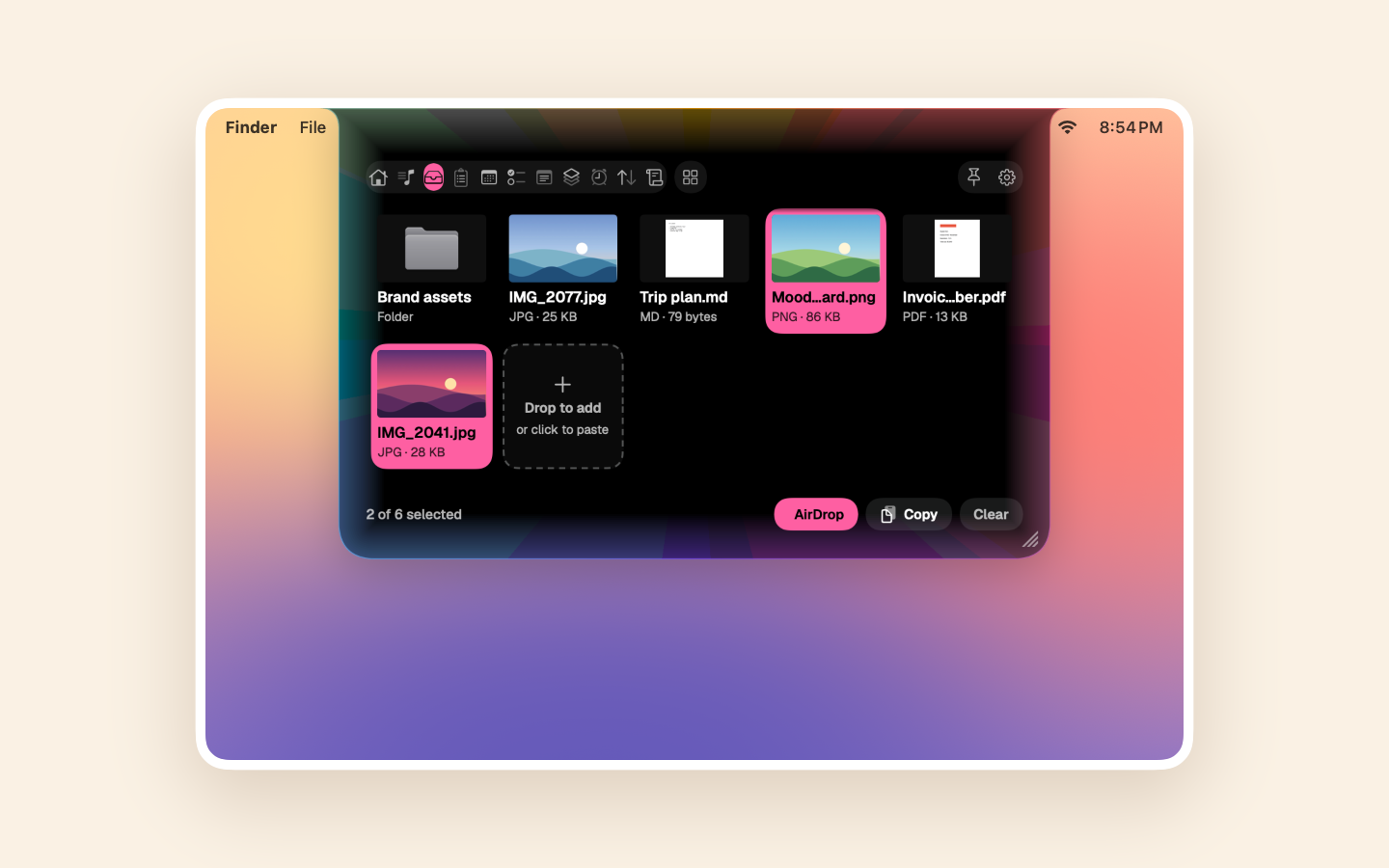
Drop files on the notch, where they wait as thumbnail tiles until you drag them out.

  • Pick some to send by AirDrop or Quick Share, copy, or preview with Space.
  • Quick Share with Android phones over your Wi-Fi, no app on the phone (direct download).
  • Files and links from a phone land right in the notch, after you accept.
The Shelf in Aurora: files as thumbnail tiles, two of them picked, with AirDrop, Copy and Clear
Both editions

Clipboard

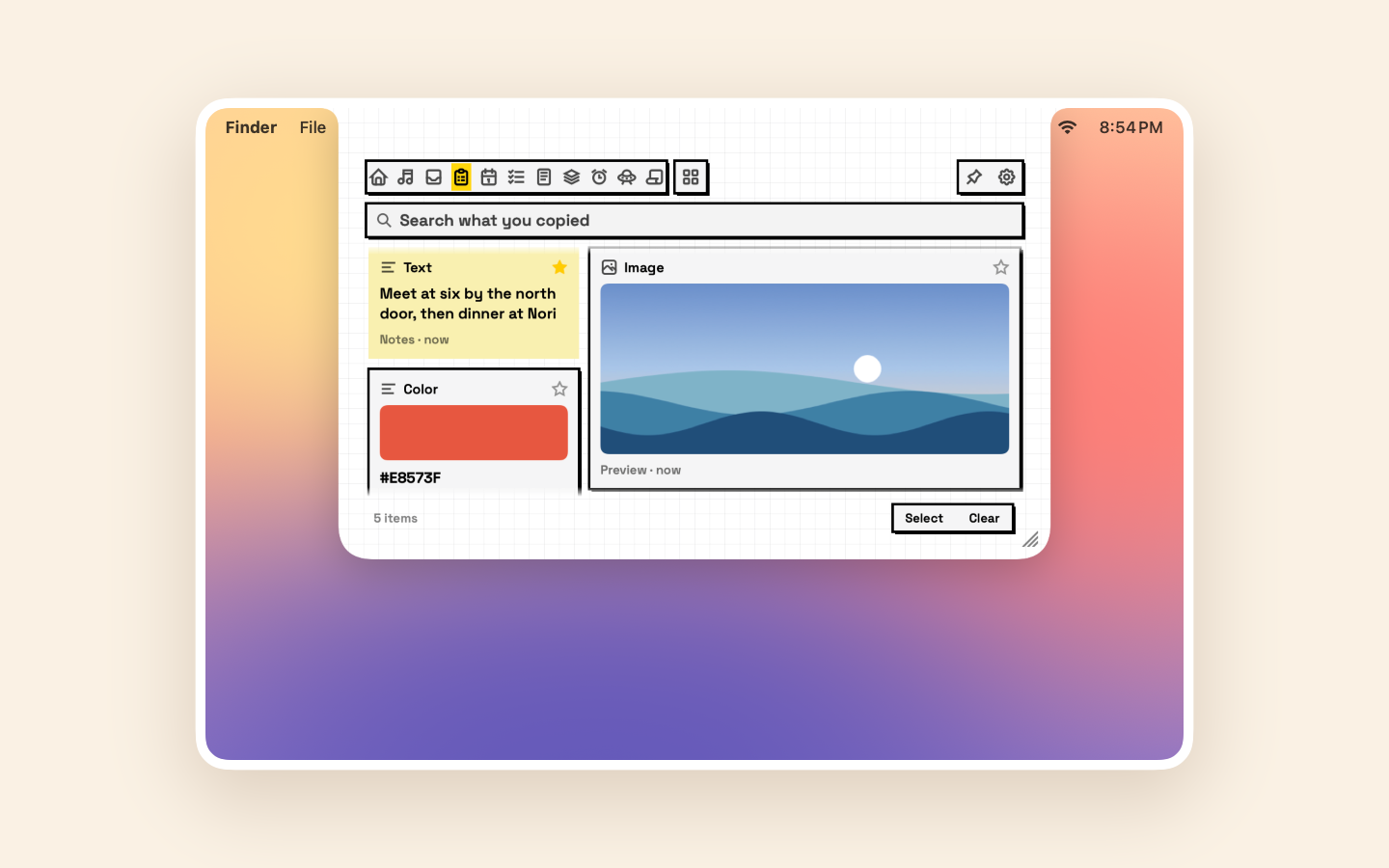
A searchable history of what you copy, one ⌃⌥V away, as a board of cards.

  • Each card sized by what it holds: images fill it, links show their site, colors show a swatch.
  • Favorites that stay, and a color of your own for any card.
  • Skips passwords and anything marked private. Off until you turn it on.
The Clipboard tab in Brutal: cards for a copied text, an image and a color, under a search field
Both editions

Calendar

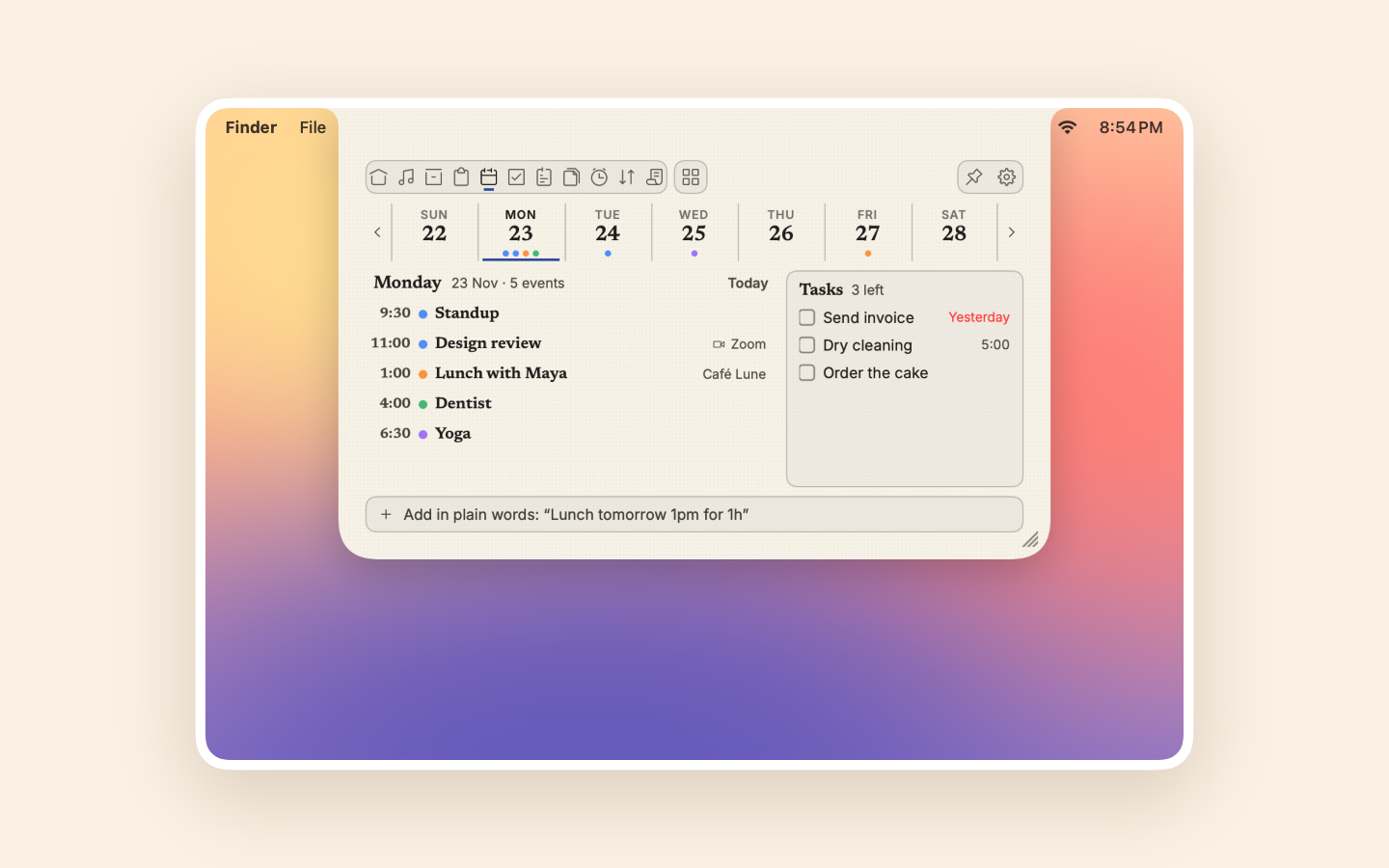
The week across the top, the day's events below, and a Join button for your calls.

  • Join Zoom, Meet, Teams, Webex, Whereby, Jitsi and FaceTime calls.
  • A countdown in the closed notch for the five minutes before a call.
  • Your tasks beside the events on every day; click one to open it in Tasks.
  • Add events in plain words: "Lunch tomorrow 1pm".
The Calendar tab in Paper: the week across the top, Monday's five events, and the day's tasks beside them
Both editions

Tasks

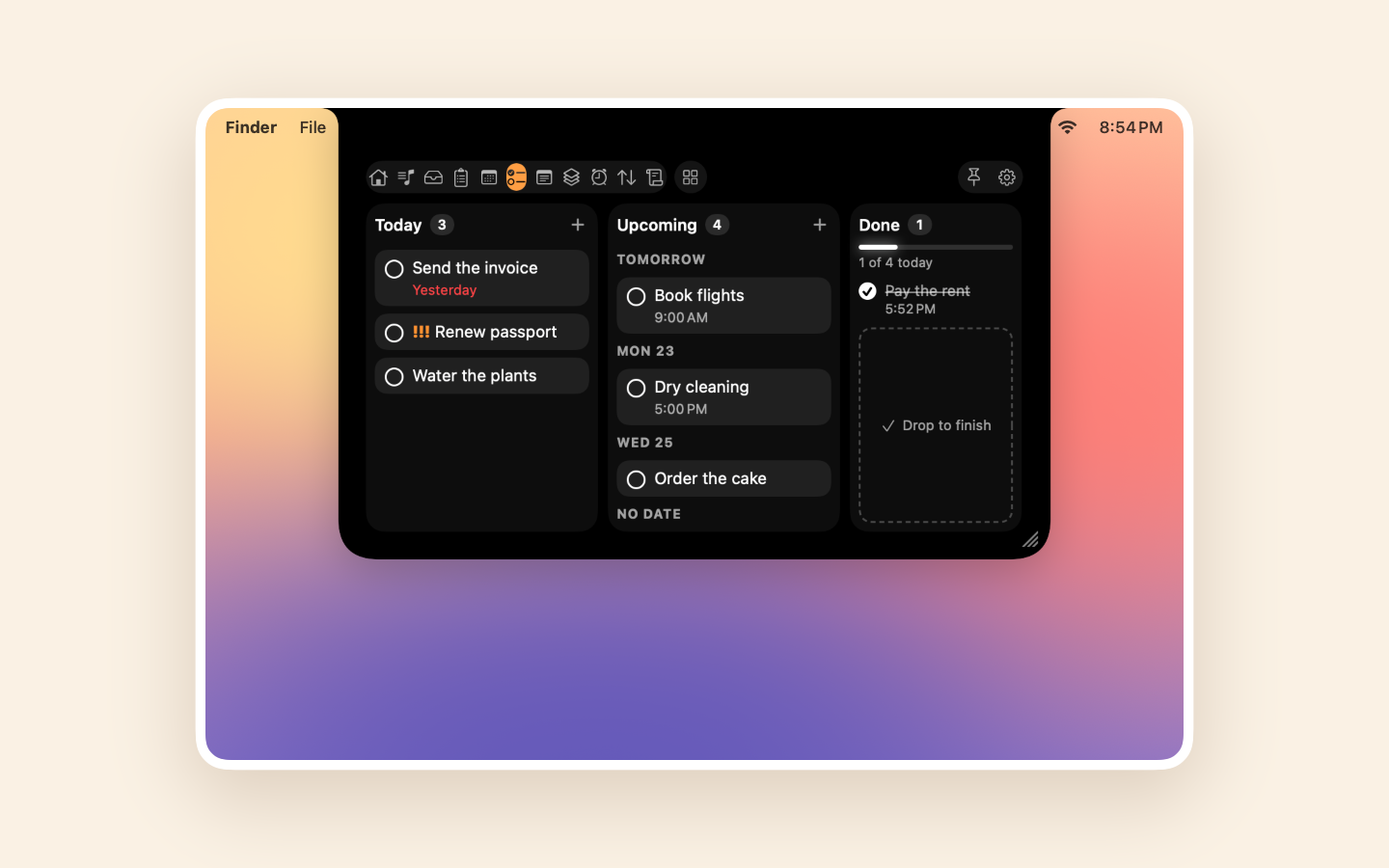
Your Reminders in three columns: Today, Upcoming and Done.

  • The task due now grows, with Done and Snooze 10 min on it.
  • Drag a card to finish it, move it to another day, or reorder.
  • Click a card to see all of it: the whole title, its notes and the full due date.
  • Add tasks in plain words: "Pay rent fri 9am !! #Home". Synced with your iPhone through iCloud.
The Tasks tab in Island: Today, Upcoming and Done columns, with a box to drop a task and finish it
Both editions

Notes

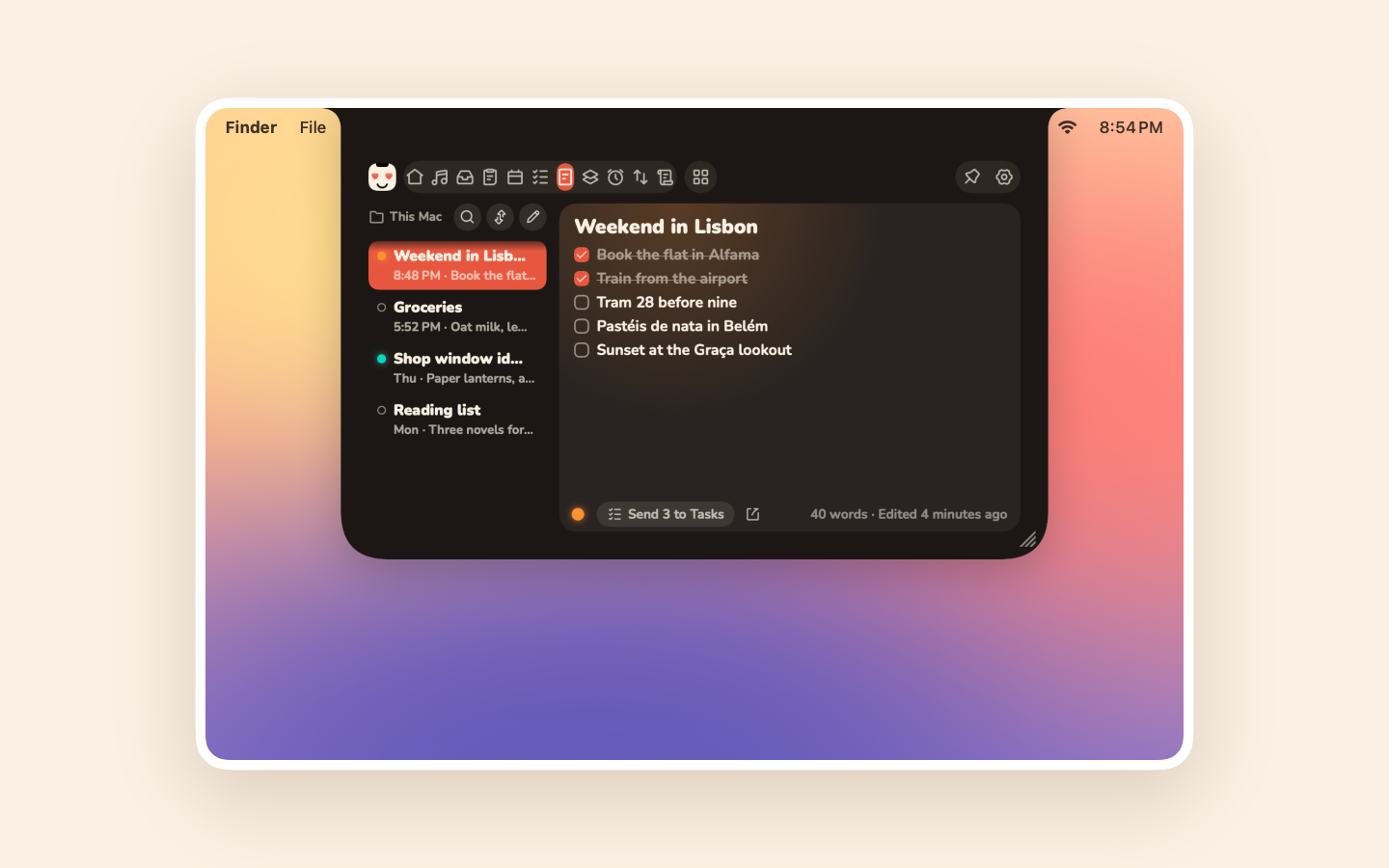
Markdown notes that save as you type, listed beside the one you're reading.

  • The open note reads as formatted Markdown, with checkboxes you tick. On macOS 26 the formatting shows as you type.
  • Plain Markdown files, anywhere you like, iCloud Drive and Obsidian included.
  • Colors, pins, search, checklists you can send to Tasks, and a ⌃⌥N shortcut.
The Notes tab in Cozy: the list of notes beside an open checklist
Both editions

Shortcuts

Four favorite shortcuts as pads, beside a log of what ran.

  • Run any other shortcut from the All list.
  • Stop a running shortcut, retry a failed one, and click to copy what it returned.
  • A Show in Notch action for your own automations.
Both editions

Timer and Keep Awake

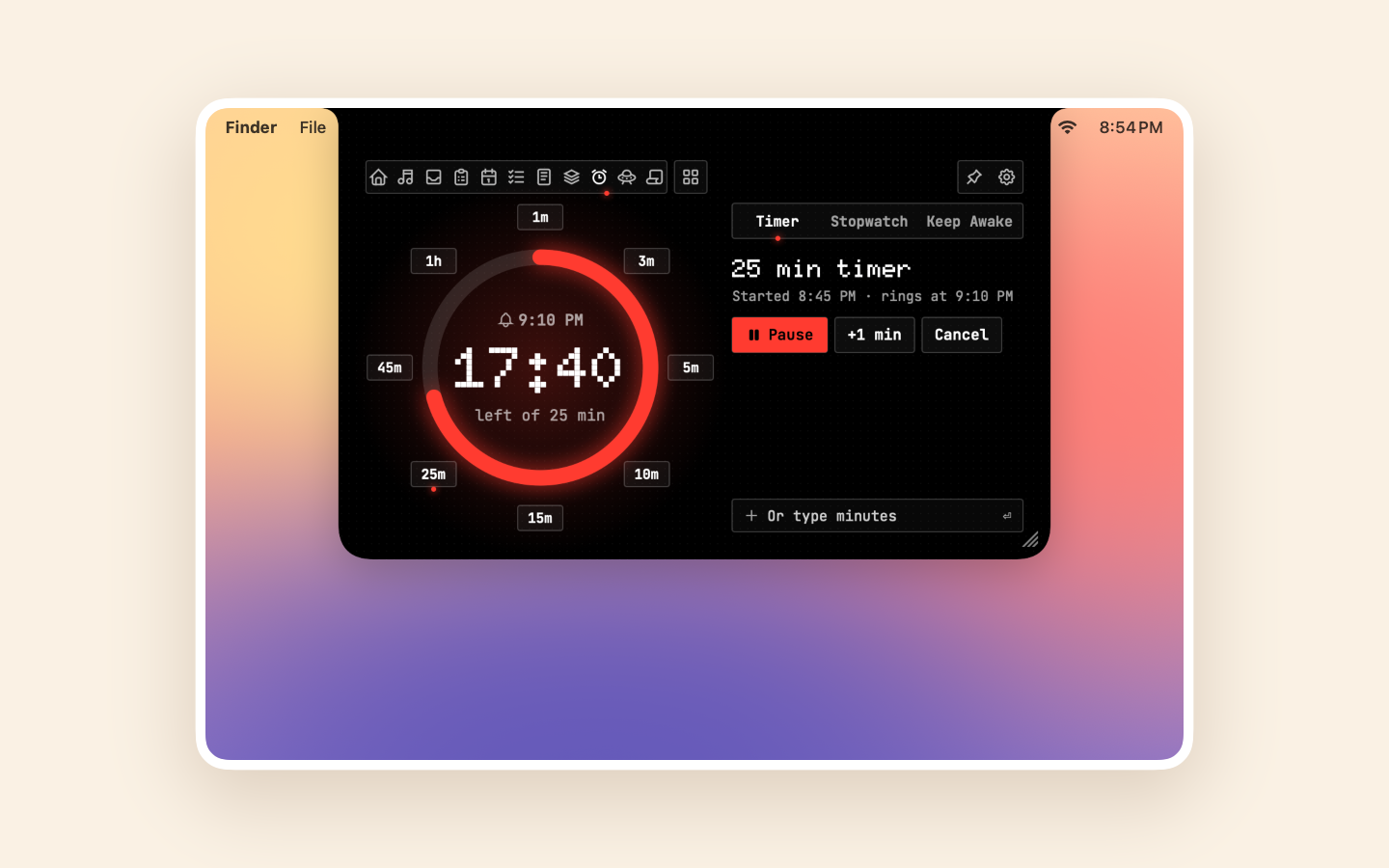
A timer dial with its presets around it like the hours on a clock, a stopwatch with laps, and Keep Awake.

  • Presets from 1 minute to 1 hour. Pick another to swap a running timer, and ⌘Z brings the old one back.
  • Keep Awake for a while or until you turn it off, with the time left in the notch.
The Timer tab in Matrix: a 25-minute timer on a dial, with presets from 1 minute to 1 hour around it
Both editions

Network

Your download and upload speed as it happens, and what you moved by day, week, month or year.

  • A ledger of today, this week and this month, beside a page of bars.
  • A big download shows its speed beside the notch, then how much it moved.
  • No permission needed. Brings in NetSpeed's history if you used it.
Both editions

Mirror

A round mirror in a ring light, for a quick camera check before a call.

  • Brighten and warm the light, with framing guides, or show the camera across the whole notch.
  • Off until you turn it on, and on only while its tab is open. Nothing is recorded.
Both editions

Prompter

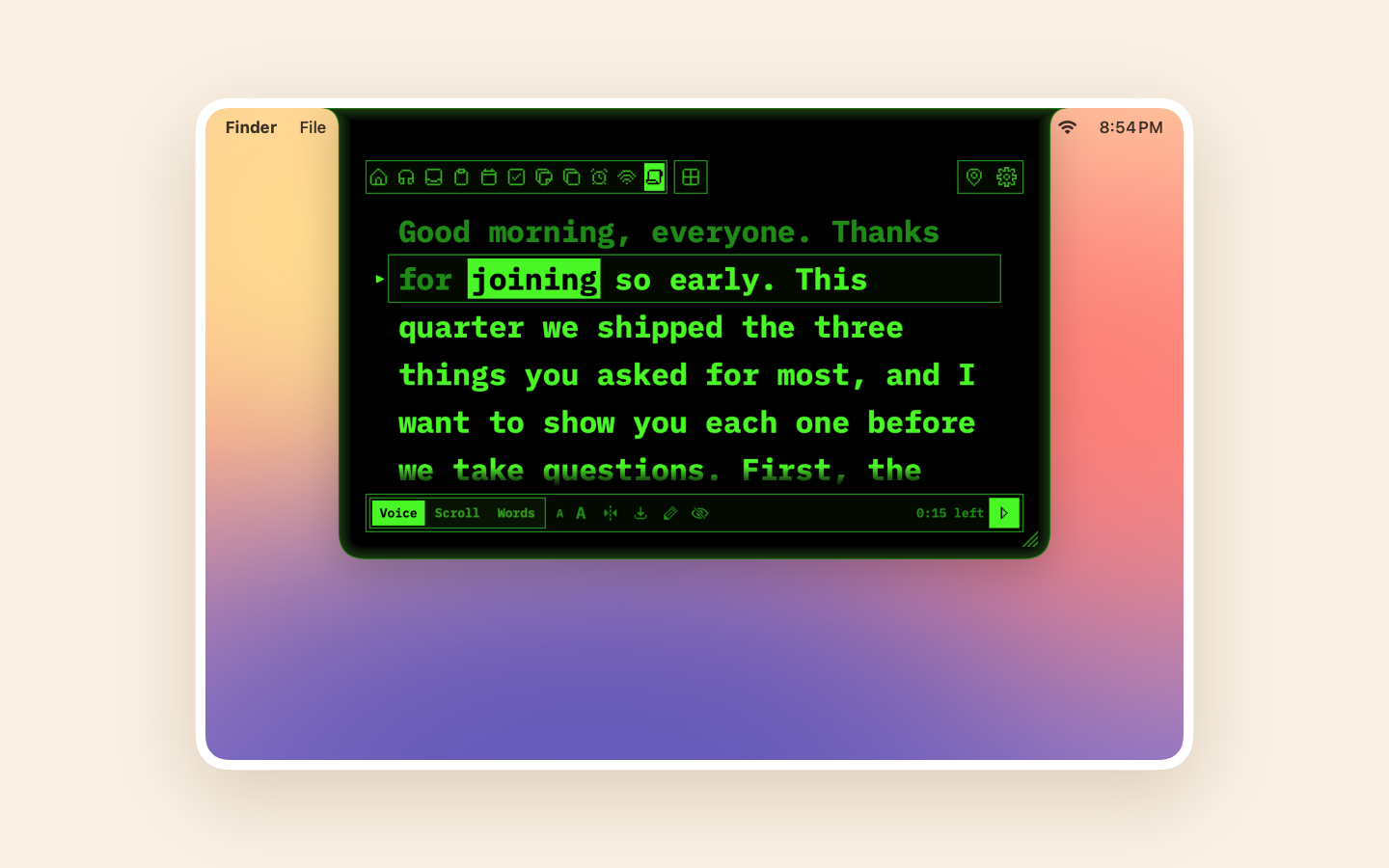
A teleprompter just under the camera that can follow your voice, recognized on your Mac.

  • What you've read dims and the next word lights up. Click any word to carry on from there.
  • Follow your voice, scroll at 0.5× to 3×, or move on only while you speak.
  • Paste a script, or import text, Markdown or a PowerPoint deck's speaker notes.
  • Out of screen sharing while a script is up. Pause from any app with ⌃⌥P.
  • Off until you turn it on. Adapted from Textream (MIT), credited.
The Prompter tab in Terminal: a script under the camera with the word being read lit
Direct download

AI Usage

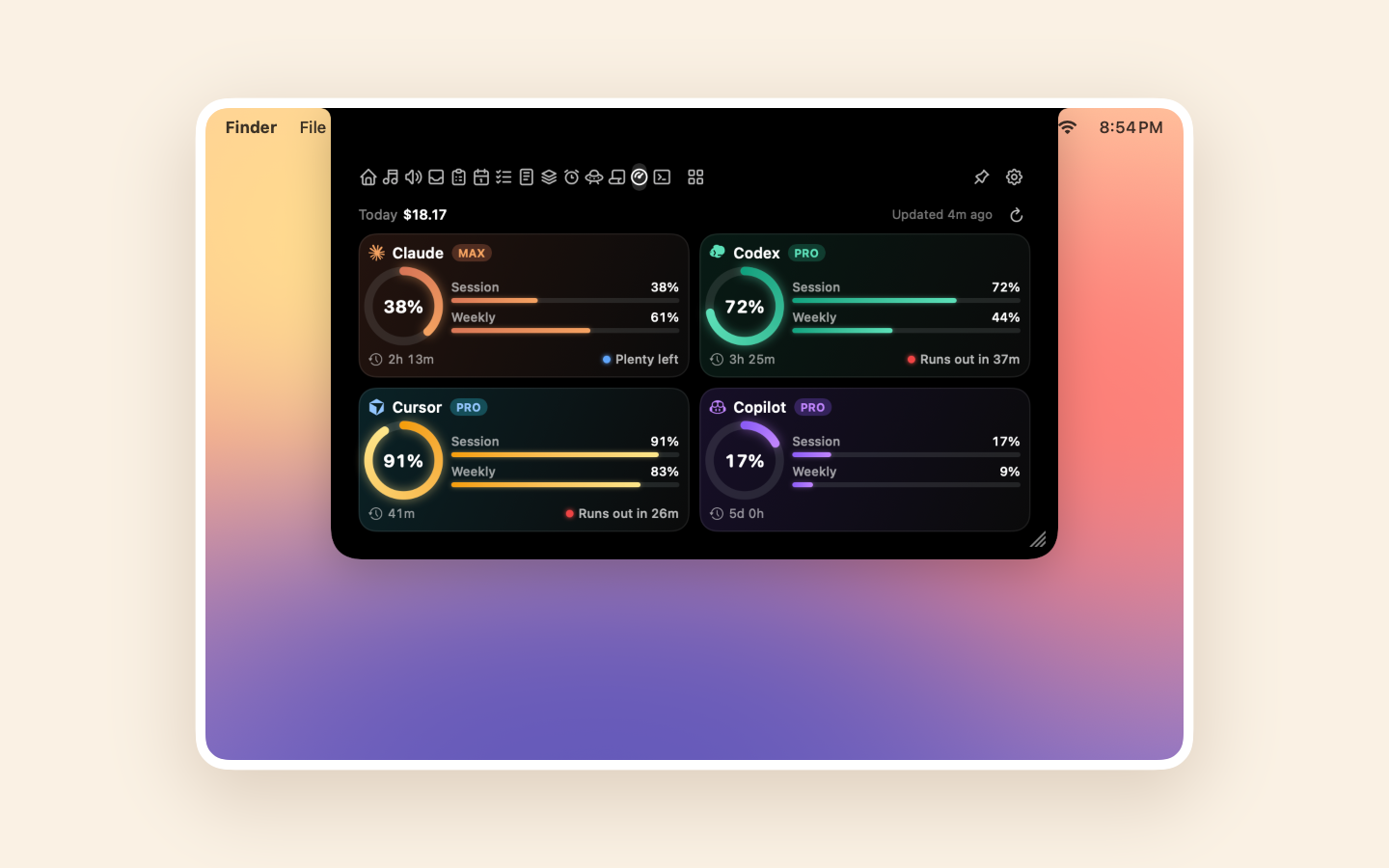
How much of each AI coding plan you've used, for 11 providers.

  • Claude, Codex, Cursor, Copilot, Antigravity, Devin, Grok, Ollama, OpenCode, OpenRouter and Z.ai.
  • A ring for the main limit, bars for the rest, reset times and pace.
  • Alerts in the notch at 80% and 95%, and when a limit resets.
The AI Usage tab: session and weekly limits for Claude, Codex, Cursor and Copilot, with reset times and pace
Direct download

Agents

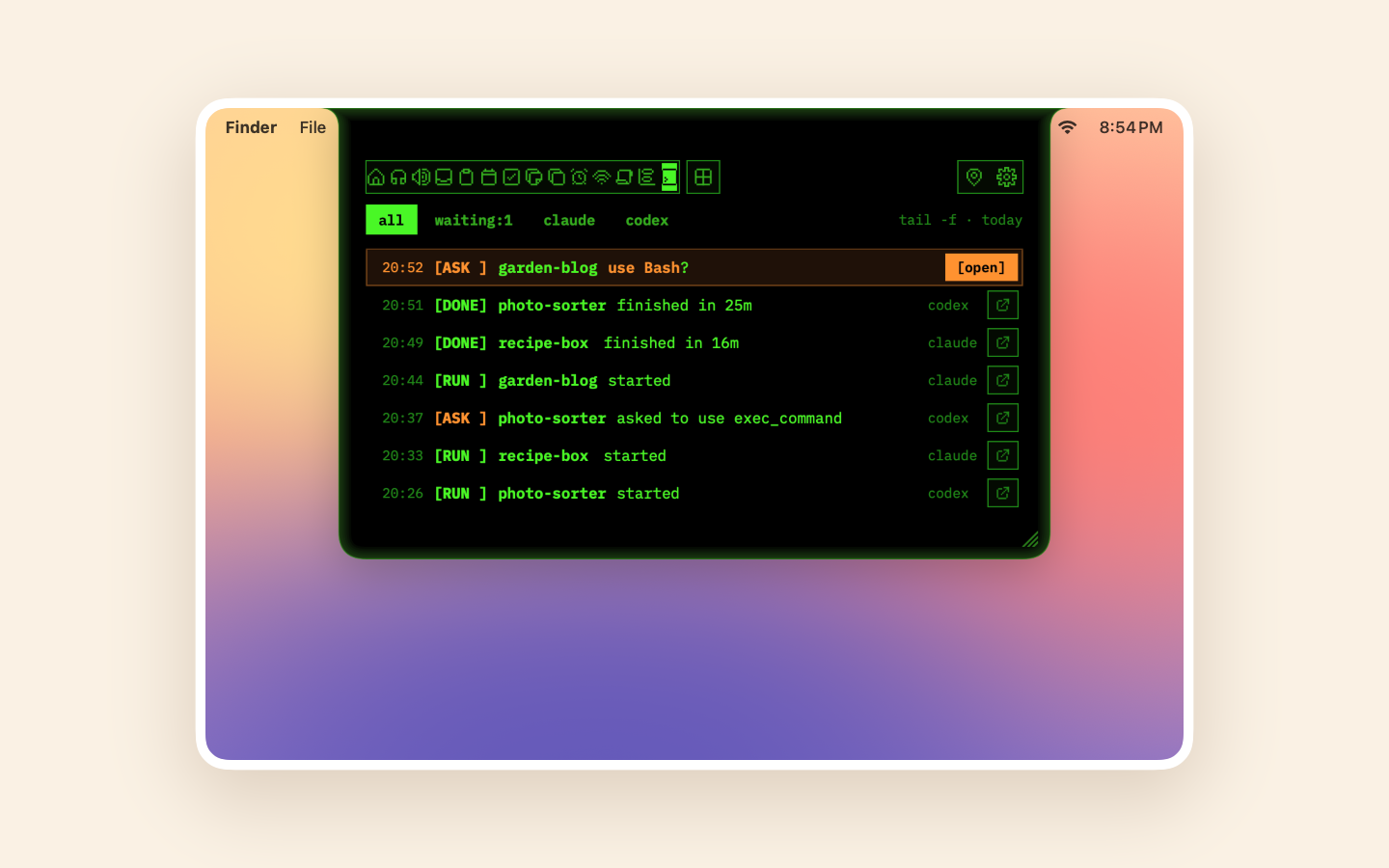
Know when Claude Code or Codex is waiting for your approval.

  • The closed notch says so until you answer, and tells you when one finishes.
  • A timeline of what they did, newest first, with Open Terminal on the one that needs you.
  • Your prompts and code are never read.
The Agents tab in Terminal: a timeline of Claude Code and Codex runs, one waiting for approval
Both editions

Live activities

Volume, charging, battery and accessory batteries, shown briefly in the notch.

  • One-shot alerts drop in as a row under the camera.
  • Ongoing ones (music, a timer, a call) sit as a tab beside it.
  • Can stand in for the macOS volume display.
Both editions

Show in Notch

Put your own message in the notch from Shortcuts, a script or any app.

  • A Shortcuts action and an ilovenotch://show link.
  • Messages are only displayed: never stored, and links in them are never opened.

Two editions

Same app, two ways in.

The direct download is free and has everything. The App Store edition is sandboxed and costs $1.99.

FeatureDirect download (free)App Store ($1.99)
The notch
Home
Media
Sound
Shelf
Clipboard
Calendar
Tasks
Notes
Shortcuts
Timer and Keep Awake
Network
Mirror
Prompter
AI Usage
Agents
Live activities
Show in Notch

In the App Store edition, Media follows Music and Spotify, and the Shelf has no Quick Share with Android.

Why ILoveNotch

What it stands for.

Free and open source

MIT licensed: read it, build it, reuse it.

Signed and notarized

Opens like any app, and updates itself.

On the Mac App Store

A sandboxed edition for $1.99, from the same code.

0.0% CPU at rest

Event-driven, no polling. Measured over a 20-hour workday.

Private by design

No accounts, no analytics, no telemetry.

Built for developers

AI Usage for 11 providers and agent approvals.

Give your notch a life.

Free and open source. macOS 14.6 or later. It updates itself from then on.

$brew install --cask niyamvora/tap/ilovenotch

Not sure which? Compare the editions